
Comparisons
CMS vs CRM: Differences, Use Cases, and What Suits You Best in 2026

Ranjeet Kumar
15 min read
If you run a website, launch campaigns, or track leads, you've probably heard content management system (CMS) and customer relationship management (CRM) used interchangeably, and that's where confusion starts. This article compares CMS vs. CRM and explains how they can be utilised in business.
These tools often sit next to each other in modern marketing stacks, but they solve very different problems. Picking the wrong one first can slow launches, break reporting, or force manual workarounds later.
You'll see what each system actually owns, when you need one versus both, and how real teams connect them without overengineering their stack. The goal is simple: help you decide what to use now and what to add next based on how your team works today.
Can a tool be both a CMS and CRM?
Yes, some platforms bundle CMS and CRM in one product family, so your website, forms, and customer records can share the same data model and automation rules. It can be convenient, but you still need to confirm the tool is strong enough in the area you rely on most (publishing workflows for CMS, pipeline/service workflows for CRM).
Do small businesses need a CRM?
If you track leads in spreadsheets, miss follow-ups, or have more than one person touching sales or support, a CRM is usually worth it. It has one place for contacts, conversations, and next steps, so work doesn't disappear in inboxes and DMs. If you have very low volume and zero repeat interactions, you can delay it, but the moment you need consistent follow-up, a CRM becomes your operating system.
CMS vs CRM vs ERP - what's the difference?
A CMS runs your digital experiences, like pages, content, publishing, and site updates. A CRM runs customer-facing workflows such as leads, deals, accounts, interactions, and service cases. While, an ERP runs core business operations like finance, procurement, supply chain, and back-office processes.
Definitions That Actually Prevent Confusion
• A Content Management System (CMS) is the system you use to create, manage, and publish digital content like pages, blog posts, landing pages, media, and layouts so your website or app stays current without turning every update into an engineering task. CMS helps your team ship content quickly and consistently.
• A CMS is optimized for editorial workflows. That includes drafting, previewing, approving, scheduling, and updating content in a controlled way, especially when multiple people publish across multiple pages. If your team measures success in publish speed, page performance, and content reuse, you are in CMS territory.
• A CMS is not a customer database. It does not track leads across the funnel, store deal histories, or manage sales and support activity tied to a person or account over time. Forms may live on CMS-managed pages, but ownership of the customer record does not.
• So if you assume our CMS already has forms and personalization, so it replaces a CRM, that's where stacks get misbuilt. Those features typically stop at content delivery, not customer lifecycle management.
• In practice, CMS platforms vary in how much autonomy they give non-technical teams. For example, newer headless options like Malible position themselves around marketer-friendly publishing workflows while still keeping content structured for modern web stacks.
So what is a CRM?
A Customer Relationship Management (CRM) system is the system you use to store and manage customer and prospect data. It tracks who your customers are, how they interact with you, and where they are in a sales or service process, so every team is working from the same history.
A CRM is built around records, pipelines, and timelines. Sales teams use it to manage deals and next steps. Marketing teams use it to segment audiences based on behavior and attributes. Support teams use it to track issues and resolutions that stay attached to the same customer profile.
That's why CRMs tend to look like Salesforce or Microsoft Dynamics 365 on the enterprise end, or HubSpot and Pipedrive for teams that want a faster setup and a simpler pipeline view.
A CRM is not a content publishing tool. It cannot manage website layouts, page versions, or editorial workflows at scale. While some CRMs can host landing pages, those tools are usually designed for quick campaign execution, not for maintaining a full website with repeatable templates and governed publishing.
So our CRM can host pages, so we don't need a CMS sounds efficient, but it rarely holds up once you need consistent site-wide publishing, better preview and approvals, and a workflow your content team can run day to day.
Why do they get mixed up in modern marketing stacks
CMSs and CRMs overlap! Forms, personalization, analytics, and automation create the illusion that they do the same job. From the outside, both touch the customer, which fuels confusion.
Modern platforms also blur boundaries by adding adjacent features. CMSs add personalization and analytics. CRMs add landing pages and content modules. The result is functional overlap.
CMS owns the experience. CRM owns the relationship. When teams align on that division, integration decisions become straightforward instead of political.
CMS vs CRM: The 7 Practical Differences That Matter Today
1. System of record content versus customer
A CMS becomes your system of record when your business needs reliable control over what is published and what version is live. It manages pages, components, media assets, and revisions so teams can ship changes without guessing which copy or layout is current. WordPress, being used by forty-three percent of all websites, is a simple indicator that content governance is a mainstream operating requirement across industries.
A CRM becomes your system of record when the business needs reliable control over customer identity and customer history. It tracks contacts, accounts, interactions, and lifecycle stages so teams can coordinate follow-up and measure outcomes across the funnel. When you do not clearly define which system owns which truth, teams duplicate records and correct information in multiple places, which is one of the fastest paths to broken reporting and mistrust.
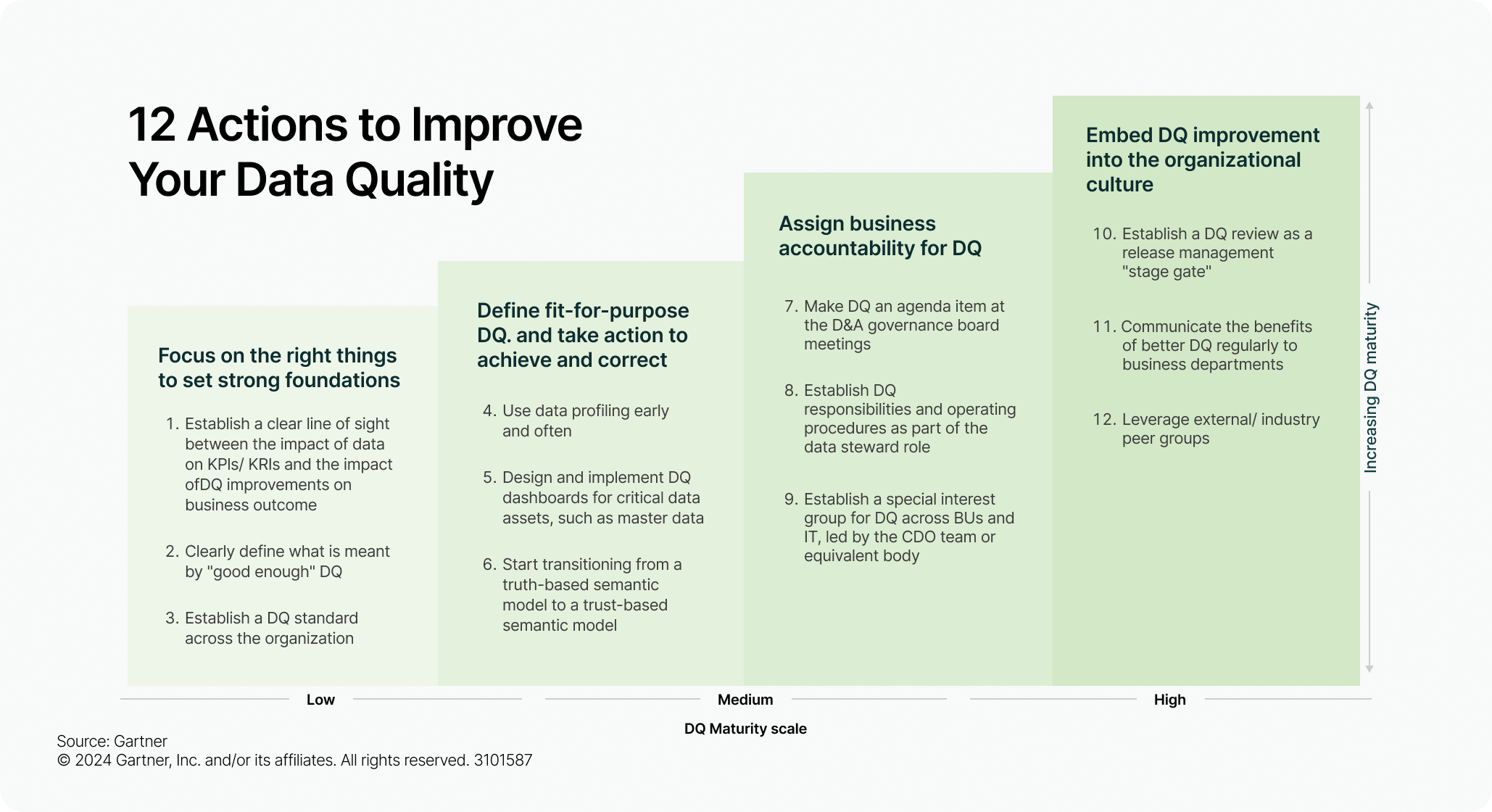
This matters financially. Gartner cites an average annual cost of at least USD 12.9 million from poor data quality, which is exactly what increases when you let multiple systems become the source for the same facts. Source Gartner.
Source: Gartner
Checklist pointers
• Decide which system is the source of truth for what is live on the site • Decide which system is the source of truth for customer identity and lifecycle stage • Document which fields must never be edited in both places • Define how conflicts are resolved when systems disagree
2. Primary workflows publish control versus pipeline control
A CMS workflow is designed to prevent unsafe releases. The native structure is drafting, review, approval, and publish, which keeps the brand and site experience stable even when many people touch the same content.
A CRM workflow is designed to prevent missed follow-up. The structure is ownership, stages, and activity discipline, so leads do not sit unworked, and service requests do not drift. This is why CRM systems emphasize assignment rules, task creation, and stage-based accountability as core behavior.
A practical way to explain the difference is to focus on the failure mode. If you try to run pipeline logic inside a CMS, you usually end up with forms and spreadsheets and inbox based follow up. If you try to run publishing logic inside a CRM, you usually end up with rigid page management and slow website iteration.
Checklist pointers
Keep drafting, review and approval inside the CMS
Keep lead stages ownership and follow-up tasks inside the CRM
Define the handoff point where a CMS action triggers a CRM action
Confirm there is a clear owner for every new lead or request
3. Data types structured content versus identity and history
CMS data is built to render consistent experiences. It is structured content such as fields, components, layouts, and metadata that can be reused across pages and channels.
CRM data is built to track relationships over time. It emphasizes identity and history, meaning who the customer is, what they did, and what your team did next across the lifecycle. TechTarget's CRM definition frames CRM as managing and analyzing customer interactions and data throughout the customer lifecycle, which is inherently longitudinal. Source TechTarget.
When teams store customer history inside a CMS, the schema starts to bloat, and permissions become unclear. When teams store content inside a CRM, web experiences become harder to change because the system is not designed to version and compose site content at scale.
Checklist pointers
• Store versioned reusable content in the CMS
• Store customer identity activity history and lifecycle stage in the CRM
• Keep consent and exportable customer lists governed in the CRM
• Avoid mixing editorial metadata with customer attributes
4. Ownership marketing and editorial versus sales and service
In most organizations, the CMS is owned by marketing, content, and web teams because their job is to publish safely and frequently. The operational requirement is preview confidence, approvals, and speed of iteration.
In contrast, the CRM is typically owned by sales, revenue operations, and service teams because their job is to maintain pipeline hygiene, enforce follow-up discipline, and produce reliable forecasting and customer visibility.
This ownership split is not politics. It is a control mechanism. CMS ownership is designed to protect brand and site integrity. CRM ownership is designed to protect revenue process integrity and customer data integrity. When ownership is vague, both tools turn into partial solutions that nobody trusts.
Checklist pointers
• Name one accountable owner for publishing rules in the CMS
• Name one accountable owner for routing and stage rules in the CRM
• Define who can change what without approvals
• Agree on an escalation path for data quality issues
5. Reporting content performance versus business outcome
CMS reporting tells you whether content is working as an experience. It focuses on page engagement, navigation behavior, and conversion actions so you can decide what to publish next and what to improve.
CRM reporting tells you whether follow-up and lifecycle execution are working as a revenue and retention system. It focuses on stage conversion, response time, pipeline velocity, and outcomes such as closed won or resolved.
The strongest proof point here is the time to follow up. The MIT Lead Response Management study reports that the odds of qualifying a lead in five minutes versus thirty minutes drop twenty-one times, and that moving from five minutes to ten minutes reduces qualification odds four times.
That is why a CRM exists as a system for immediate ownership and action. A CMS can capture a form submission, but it does not create the operational discipline that protects speed to lead by default.
Checklist pointers
• Review CMS metrics to decide what to publish and improve
• Review CRM metrics to decide how fast and how consistently you follow up
• Track response time and stage movement in the CRM
• Connect the landing page source to CRM outcomes to avoid vanity reporting
6. Governance publishing safety versus customer privacy and export control
CMS governance is primarily about publishing safety. Many systems explicitly model content approvals and role-based publishing, so unreviewed content does not go live.
CRM governance is primarily about protecting customer data. Salesforce documentation on exporting data highlights that export capability is permission-controlled and that users with specific export permissions can access exported data. This reflects the reality that CRM governance is heavily tied to privacy risk and data movement risk.
When teams blend these models, they create real risk. Either brand risk when content is published without proper approval, or compliance risk when customer data can be exported too broadly.
Checklist pointers
• Keep content approval roles and publishing permissions in the CMS
• Restrict customer data export permissions in the CRM
• Review who can export lists and backups on a schedule
• Document approval requirements for high-risk pages, such as pricing and legal
7. Time sensitivity release cycles versus real-time relationship signals
CMS work typically moves in release cycles, even when the cycle is fast, because the system is designed to protect the live experience through review and validation before publishing. CRM work is triggered by real-time relationship signals such as a form submission, a stage change, or a support request, and it must create immediate ownership and action.
Checklist pointers
• Set a response time target for inbound leads and enforce it in the CRM
• Ensure every submission creates an assignment and a next step automatically
• Keep publishing approvals in the CMS even during urgent campaigns
• Decide which signals require real-time sync and which can be scheduled
Decision Tree: Which One Do You Need
If your bottleneck is shipping and updating experiences, start with CMS first. If your bottleneck is follow-up, pipeline control, and customer history, start CRM first.
If you need both acquisition and retention to scale, use both and design the integration so the CMS captures intent and context while the CRM triggers action and tracks outcomes.
B2B lead generation
Start CRM first. Your primary risk is not publishing slowly; it is responding slowly. First integration step: Send every CMS form submission into the CRM and store the landing page and campaign source on the lead record. Avoidable mistake: Letting leads land in an inbox or spreadsheet with no owner and no follow-up discipline.
Ecommerce
Start CMS first because the storefront experience determines whether a customer converts at all. Baymard reports an average documented cart abandonment rate of 70.22% based on dozens of studies, which is why on-site experience and checkout clarity are decisive. Source Baymard. First integration step: Sync purchase and browse events into the CRM or a customer platform connected to the CRM, so follow-up is behavior-based. Avoidable mistake: Trying to"email your way out of checkout and pricing friction.
SaaS trials
Use both, with a clear sequence. Use the CMS for onboarding content and product education, and use the CRM for lifecycle control, routing, and handoffs. Speed still matters because trials decay quickly without timely engagement, and the MIT study quantifies how sharply odds drop as minutes pass. First integration step: Push trial started and key activation events into the CRM to trigger onboarding and assignment rules. Avoidable mistake: Running generic nurture sequences because product events never connect to the customer record.
Service business quotes and consultations
Start CRM first because the business runs on rapid response and consistent follow-up. First integration step: Route CMS contact forms into the CRM with automatic assignment and follow-up tasks. Avoidable mistake: Treating the website form as the system and losing visibility into who followed up and what happened next.
Multi-location brand
Start CMS first for consistent local pages, offers, and updates, then use CRM to track loyalty and repeat visits centrally. The problem is consistency at scale on the content side and unified history on the customer side. First integration step: Capture location context, such as page and store in the CRM for every form and call to action. Avoidable mistake: Creating separate mini systems per location that fragment customer history and reporting.
Content-led media brand
Start CMS first because content is the product and publishing cadence is core operations. First integration step: Send subscriber signups from the CMS into the CRM with interest tags based on topic or series, so lifecycle messaging is relevant. Avoidable mistake: Measuring only traffic and never connecting consumption to the subscriber lifecycle and revenue.
If you're choosing today, start with the decision tree and integration pattern
Use the decision tree to pick your starting system, then plan the first integration immediately. CMS captures intent (pages and forms), whereas CRM owns the record (lead/account) and triggers follow-up (tasks, sequences, SLAs). Pick the scenario that matches your business model, then implement the one integration sentence from that scenario before you add any new tools.
If you already have both, use a quick checklist and mapping section to fix gaps
Run this quick checklist to find where the stack is leaking:
• One source of truth: Content lives in the CMS; customer identity and lifecycle live in the CRM.
• Clean handoff: Every form, signup, and high-intent action creates/updates a CRM record with a clear owner.
• Fast follow-up: CRM routing and tasks fire automatically, so leads and tickets do not sit unowned.
• Shared context: The CRM stores the "where it came from" context (landing page, campaign, content offer).
• Closed-loop learning: You can trace outcomes (qualified, won, retained) back to the content that initiated it. Then do a simple mapping pass.
List your top 5 website actions (demo request, pricing page visit, contact form, trial start, support request) and confirm where each one lands in the CRM and what happens next (task, notification, sequence, pipeline stage). If any action has no owner or no next step, fix that before you redesign pages.
Your next action is to pick one scenario above and implement its first integration today, then revisit the checklist in one week to confirm leads, customers, and content performance are finally connected.
P.S. Our team can help you map your CMS and CRM roles, choose the right starting system and set up the first integration that stops lead and content data from leaking

Schedule a Call
Experience the difference a truly user-centered CMS can make. Schedule a Malible demo today and see why teams actually prefer working with us.